Free SEO Chrome extension
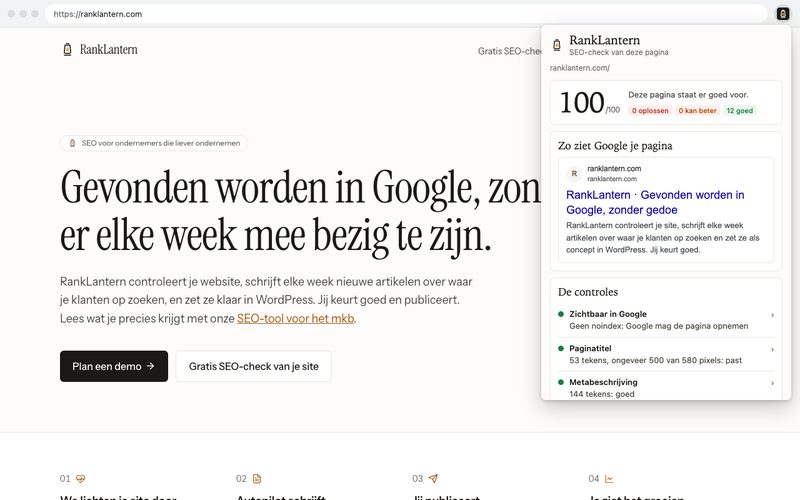
Click the little lantern and you see straight away how the page you have open is doing: title, description, headings, canonical, alt texts and more. For each point, plain-language advice on what to do about it. No account, and everything stays in your browser.
What the extension checks
Twelve checks on the page you have open. Each check is green, orange or red, and together they give a score from 0 to 100.
- Visible in Google: is the page set to noindex or nofollow?
- Page title: present, its length and whether Google cuts it off (width in pixels)
- Meta description: present and between 120 and 155 characters
- H1 heading: exactly one main heading
- Heading structure: all headings from H1 to H6 as a list, and whether a level is skipped
- Canonical: present, and does it point to the page itself or to another address?
- Page language: the lang attribute
- Alt text on images: how many images have no alt
- Links: internal and external links counted
- Structured data (schema): which JSON-LD types are on it, and whether there's an error in it
- Sharing on social media: og:title and og:image
- Amount of text: the number of words in the main text
You also see how Google shows the page: the title, the address and the description, cut off where Google cuts them off.
How the score works
A red point costs 15 points, an orange point 5. The RankLantern audit uses the same weighting. A page with everything green scores 100.
A red point is something to pick up first, such as a page without a title or a page set to noindex. Sometimes that's intended, for example on a thank-you page. The explanation for each point says when.
One page or your whole site
The extension looks at one page at a time. Want to know how your whole site is doing, with broken links, duplicate titles and pages Google can't reach? Then run the free SEO check: up to 30 pages and over 60 checks. If you'd like it to happen on its own every week after that, look at the pricing page.
Privacy
The extension collects no data. It only reads the page you have open when you click the icon, and only that page. The check runs in your browser and the result disappears when you close the popup.
- Nothing goes to RankLantern or to other parties: no addresses, no page content, no usage data.
- The extension stores nothing, uses no cookies and measures nothing (no analytics).
- No code is loaded from the internet; everything is in the extension itself.
- If you click a button to ranklantern.com, that page simply opens in a new tab. The address then says you came through the extension (utm_source=chrome-extension). On ranklantern.com our privacy statement applies.
Which permissions the extension asks for
- activeTab: access to the tab that's open, only at the moment you click the icon. The extension can't look at other tabs or in the background.
- scripting: to read the title, headings and other data of the page in that tab. The extension changes nothing on the page.
Questions? Email hello@ranklantern.com.
Frequently asked questions
›What does the extension cost?
Nothing. You don't need an account and there's no trial period or subscription attached.
›Does the extension send data to RankLantern?
No. The check runs entirely in your own browser. Nothing goes to RankLantern or anyone else, and the extension stores nothing.
›Does the extension work on every website?
On ordinary web pages, yes. Chrome doesn't let any extension look at its own pages (such as chrome:// pages), the Chrome Web Store and some PDFs.
›What's the difference with the free SEO check on the site?
The extension looks at one page, the page you have open. The free SEO check goes through up to 30 pages of your site with over 60 checks, such as broken links, duplicate titles and pages Google can't reach.
›Which language is the extension in?
In Dutch if your browser is set to Dutch, otherwise in English.
Start with a free check
Over 60 checks on up to 30 pages, done in a minute. Then you know what could be better.
What happens after your request
- 1. You pick a time that suits you in the calendar.
- 2. You get a confirmation by email with the link for the call.
- 3. We look at your site together for 30 minutes, free and without obligation.